
A WhatsApp Business template is a message you write once, submit to Meta for approval, and then send to customers who have not messaged you first. If you want to send an order confirmation, a one-time passcode, or an appointment reminder on WhatsApp, it must be sent via an approved template. That single rule shapes almost everything about how businesses use WhatsApp to reach people.
This guide explains what templates are, the three categories Meta sorts them into, how approval works, and how to get your templates cleared without a string of rejections. It is written for teams in Ghana running customer messaging, whether you sell online, run a clinic, or handle payments, and it assumes no prior WhatsApp API experience.
What a WhatsApp Business template is
On a personal WhatsApp account, you type whatever you want and hit send. Business messaging through the WhatsApp Business API does not work that way. Meta separates business messages into two kinds, and the difference decides what you are allowed to say and when.
A template message is pre-written and pre-approved. You register the wording with Meta, wait for a review, and once it is approved, you can send it to any customer who has opted in, at any time. A session message is different: it is a free-form reply an agent can send only inside the 24-hour window that opens when a customer messages you. Most proactive outreach- the confirmations, reminders, and codes you send without being prompted- has to be a template. Africala's WhatsApp Business API handles both, but templates are where most businesses spend their time.
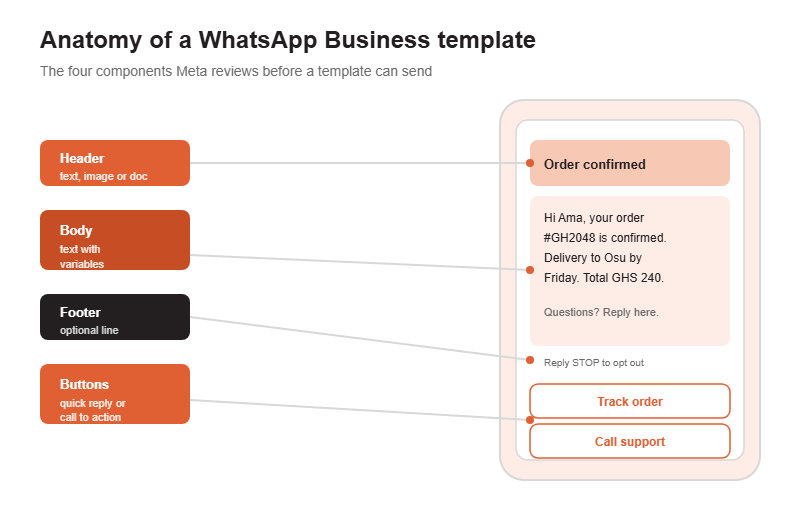
A template has up to four parts. The header is an optional line at the top, either short text or an image, document, or video. The body is the main message and the only required part. The footer is a small optional line, often used for something like an opt-out note. Buttons are optional too, either quick replies or call-to-action buttons that open a link or dial a number.
Variables: how one template fits every customer
You do not write a separate template for every customer. Instead, you use variables, which are numbered placeholders like {{1}} and {{2}} that you fill in at send time. A single order-update template can greet Ama by name and quote her order number, then greet Kofi and quote his, all from the same approved text. When you submit the template, you provide sample values for each variable so the reviewer can see how it reads in practice.
The three template categories
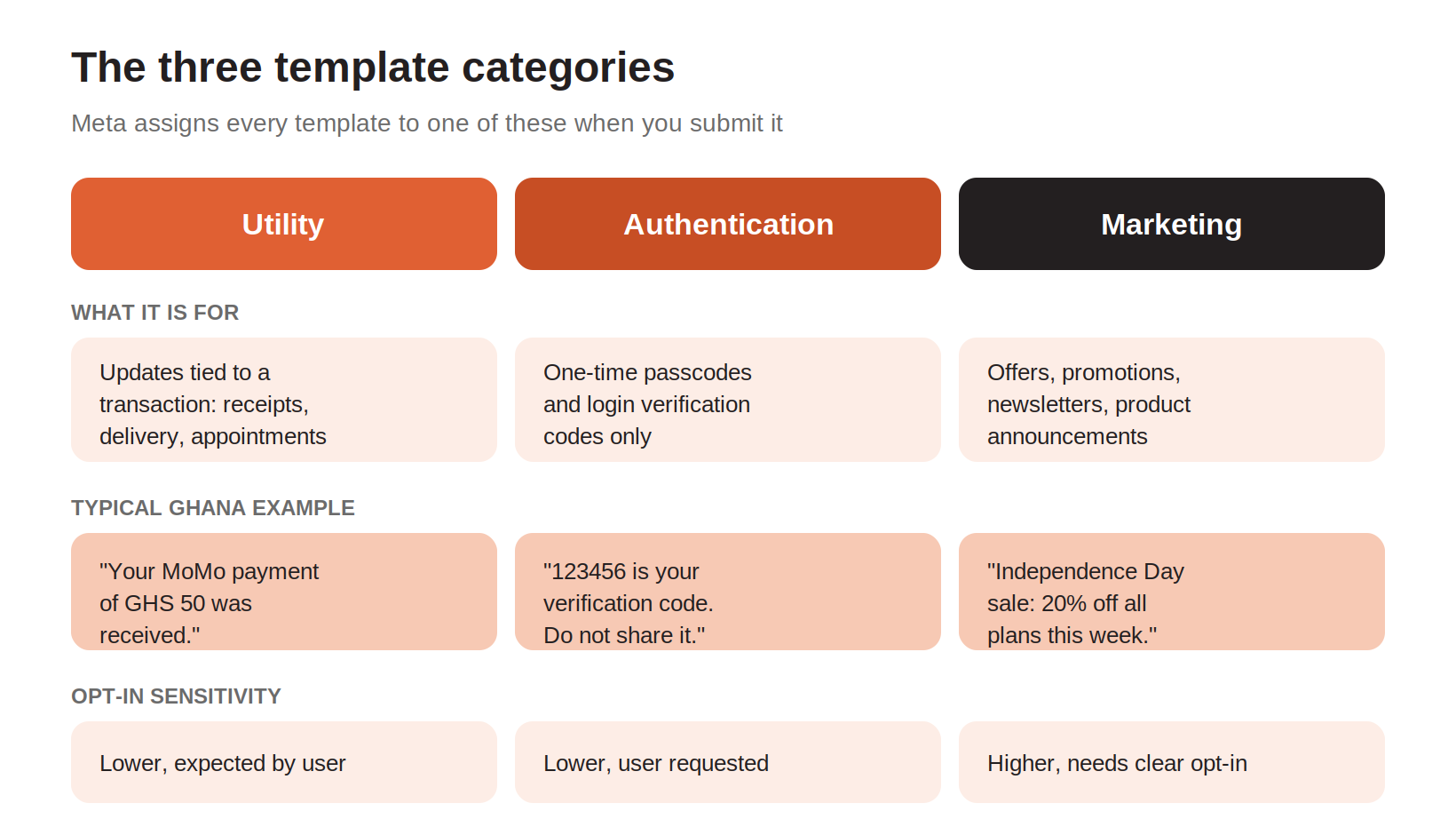
When you submit a template, Meta files it under one of three categories. The category is not a label you pick for fun. It affects how the template is reviewed, how customers experience it, and how you are expected to have collected consent. Getting the category wrong is one of the most common reasons a template is rejected.
Utility templates
Utility templates carry information tied to a specific transaction or account. Think order confirmations, delivery updates, payment receipts, and appointment reminders. A Ghanaian e-commerce shop confirming that a customer's package is out for delivery in Kumasi is sending a utility message. So is a clinic in Accra reminding a patient of tomorrow's appointment. Customers expect these, so they tend to move through review smoothly.
Authentication templates
Authentication templates exist for one job: sending one-time passcodes and login verification codes. If a FinTech in Accra wants a customer to confirm a Mobile Money transaction with a code, that code goes out through an authentication template. These are deliberately narrow. You cannot slip a promotion into an authentication template, and the format is kept simple on purpose. Many businesses pair WhatsApp codes with a fallback channel so a customer still gets the code if WhatsApp is unavailable, which is where OTP SMS delivery earns its place.
Marketing templates
Marketing templates cover anything promotional: sales, offers, newsletters, product launches, and win-back messages. These face the closest scrutiny and depend most heavily on clear consent. A retailer promoting an Independence Day sale is sending a marketing template, and the customer needs to have agreed to receive that kind of message. Send marketing content to people who did not opt in, and you risk blocks, complaints, and a lower quality rating on your number.
Template messages versus session messages
Because the template rule trips up so many teams, it helps to see the two message types side by side. The short version: templates let you start a conversation; session messages let you continue one.
| Template message | Session message |
When you can send it | Any time, once approved | Only within 24 hours of the customer's last message |
Needs Meta approval | Yes, before first use | No |
Typical use | Order updates, OTPs, reminders, offers | Live support replies inside an open chat |
Free-form wording | No, must match the approved text | Yes, agents type naturally |
Templates for proactive outreach, session messages for live replies inside an open conversation.
In day-to-day operations, you use both. A customer gets a template telling them their order shipped, taps a button to ask a question, and now a 24-hour window is open in which your support team can reply freely. Pairing approved templates with a WhatsApp chatbot for the replies is how a lot of Ghanaian businesses keep response times low without staffing a desk around the clock.
How template approval works
Every template goes through review before you can send it. The process is straightforward once you have seen it, and most templates are approved quickly, sometimes within minutes, though Meta allows itself up to 24 hours.
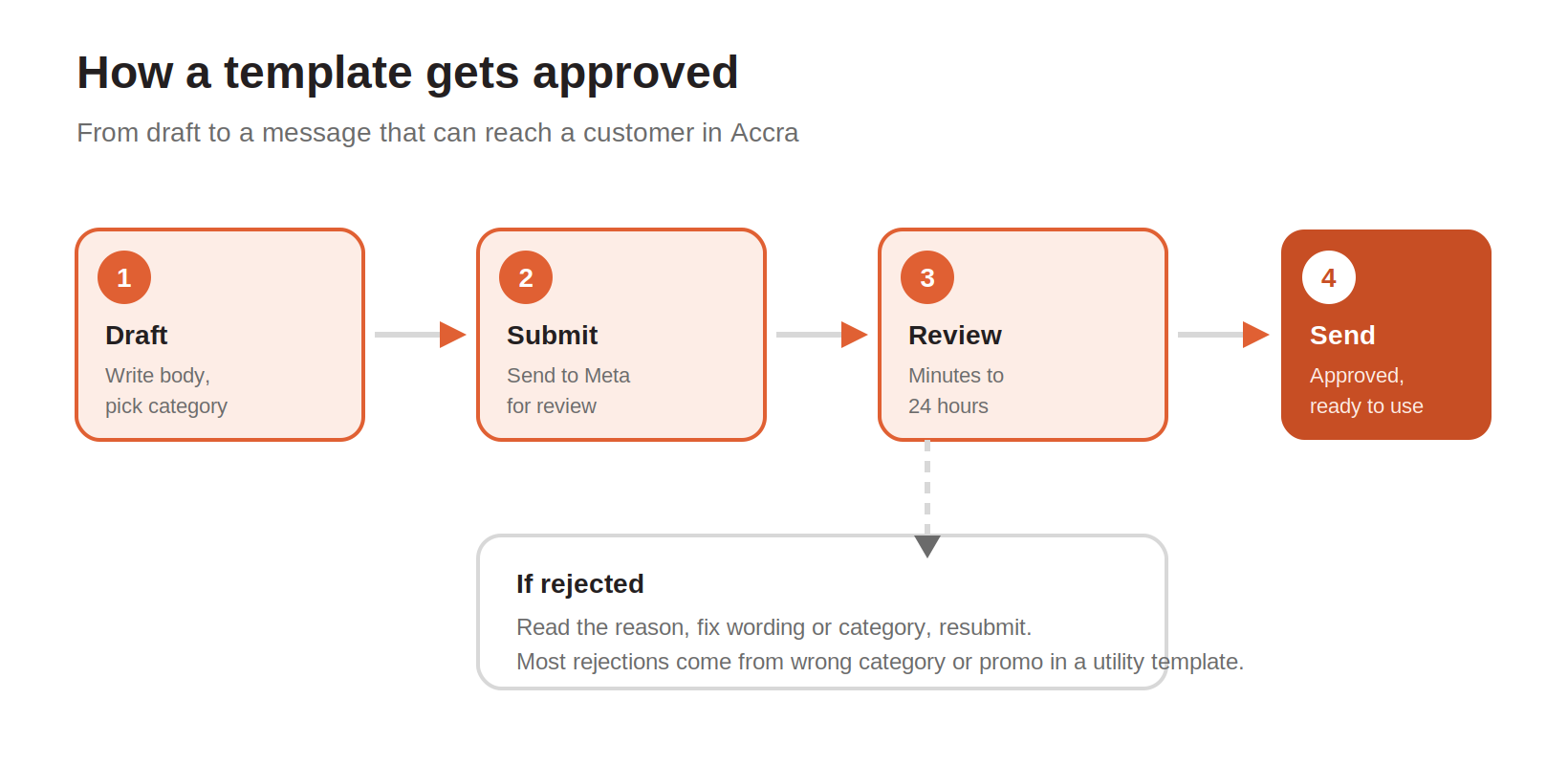
You draft the template and choose its category. You submit it. Meta reviews it against its messaging policy, checking that the wording matches the category, that nothing looks deceptive, and that there is no prohibited content. If it passes, the template is approved and ready. If it fails, you get a reason, and you can fix the issue and resubmit as many times as you need.
A rejection is not a penalty. It is feedback. The usual culprits are a promotional line hiding in a utility template, a category that does not match the content, or vague wording that a reviewer cannot map to a clear purpose. Fix the specific problem, resubmit, and you are usually through on the second try.
How to get templates approved the first time
You cannot control Meta's review, but you can remove the things that reliably cause rejections. Most of it comes down to writing clearly and being honest about what the message is for.
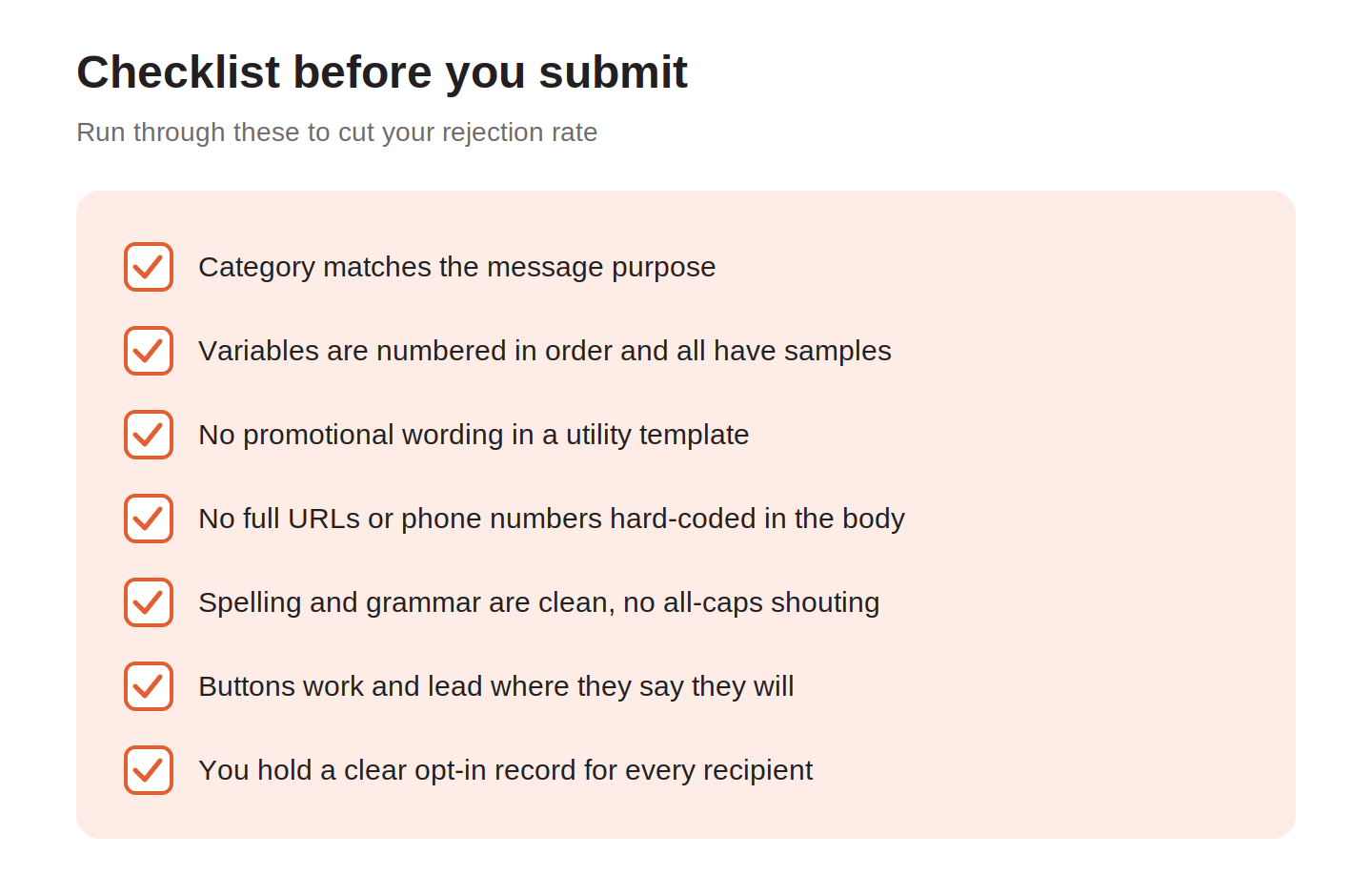
Run through this before every submission. Most rejections come from the first three items.
● Match the category to the message. If it informs about a transaction, it is utility. If it carries a code, it is authentication. If it sells, it is marketing. Do not label a promotion as utility to dodge consent rules.
● Number your variables in order and give a realistic sample for each. A reviewer who cannot picture the finished message is more likely to reject it.
● Keep promotional language out of utility and authentication templates. No discounts, no upsells, no marketing calls to action in a message that is meant to inform.
● Avoid hard-coding full URLs or phone numbers in the body. Use buttons for links and calls instead.
● Write clean, correctly spelled text with no all-caps shouting. Sloppy wording reads as spam to a reviewer.
● Keep a clear record of opt-in for everyone you plan to message, especially for marketing.
Consent and the rules that apply in Ghana
WhatsApp is a permission-based channel everywhere, and that principle does not bend by market. Before you send a template to a customer in Ghana, you need their consent to be contacted on WhatsApp, and for marketing you need consent specific to promotional messages. Consent can come from a checkout checkbox, a form, or a customer messaging you first, as long as you can show it was given.
Ghana also has its own data protection framework, and specific rules around electronic communication and marketing can change over time and are enforced locally. If you are unsure how a national requirement applies to your messaging, get advice for your own situation rather than assuming a rule from another market carries over. On the platform side, keeping your data protection and fraud practices tight protects both your customers and your sender reputation.
The practical habit that keeps you safe is simple. Only message people who asked to hear from you, make opting out easy, and keep your promotional volume sensible. Numbers that generate blocks and complaints get downgraded, and a downgraded number reaches fewer people.
Putting templates to work
Once you understand categories and approval, templates become a dependable way to reach customers at the moments that matter. An online store in Ghana can confirm orders, share delivery updates, and recover abandoned carts. A bank or FinTech can send transaction alerts and verification codes. A clinic can cut no-shows with appointment reminders. These same journeys often run across channels, with transactional SMS alerts as a fallback when a customer is not reachable on WhatsApp.
Africala helps businesses in Ghana set up and manage all of this: registering templates, getting them through review, and sending them reliably through the WhatsApp Business API. You get the WhatsApp channel alongside SMS and voice in one place, with direct operator connectivity and support when a template stalls in review or a campaign needs to go out. For businesses that also want ongoing customer updates, WhatsApp notifications cover recurring order and account messages that keep customers informed.
If you are weighing up WhatsApp for your business in Ghana, the fastest way to see what fits is to talk to the Africala team about your use case and volumes.
Frequently asked questions
Do I need to get every WhatsApp message approved?
No. Only template messages need approval, and you only submit each template once. Free-form session replies your team sends inside the 24-hour window after a customer messages you do not need approval. Approval covers the proactive messages you send without being prompted.
How long does WhatsApp template approval take?
Often minutes, and Meta allows up to 24 hours. Simple, clearly written templates in the right category tend to clear fastest. If a template is rejected, you can fix it and resubmit right away, so a first-round rejection rarely costs you more than a short delay.
Why do WhatsApp templates get rejected?
The most common reasons are a category that does not match the content, promotional wording inside a utility or authentication template, and vague or sloppy text a reviewer cannot map to a clear purpose. Meta gives a reason with each rejection, so read it, fix that specific issue, and resubmit.
What is the difference between utility, authentication, and marketing templates?
Utility templates carry transaction and account information like order and delivery updates. Authentication templates carry one-time passcodes and verification codes only. Marketing templates carry promotions, offers, and newsletters and need the clearest opt-in. Pick the category that honestly describes what the message does.
Can I send WhatsApp marketing messages to customers in Ghana?
Yes, if the customer has opted in to receive promotional messages from you and you use an approved marketing template. Keep a record of that consent, make opting out easy, and keep your volume reasonable so your number keeps a healthy quality rating.
Do I still need SMS if I use WhatsApp templates?
Many businesses keep both. WhatsApp reaches customers with a rich, interactive message, while SMS reaches any phone without an internet connection or the app installed. Using SMS as a fallback for codes and critical alerts means a customer still gets the message when WhatsApp cannot deliver it.
How do variables work in a template?
Variables are numbered placeholders such as {{1}} and {{2}} that you fill with real values at send time, like a customer's name or order number. They let one approved template serve every customer. When you submit the template, you provide a sample value for each variable so the reviewer can see the finished message.